What most people don't understand is that art is more than simply paintings, drawings, sculptures, etc. Have you ever seen a play? Have you ever listened to music? Have you ever used a computer? You are exposed to millions of art types everyday. My personal favorite arts type is the perfoming arts. Theatre, film, music, dance, and more. I have grown up in the theatre, and I find an unattainable comfort on stage. A trip to New York city to see a Broadway show is an excellent trip that I make at least once or twice a year. I love arts and always want to be surrounded by them.
So, the next time you turn on the radio, or read an article in a magazine, remember that you are engulfing yourself into the arts. Never underestimate their power, and never forget their beauty.
Sunday, January 22, 2012

Tuesday, January 10, 2012
OSI and other frustrations
Networking, watch out. I hate you already. Why can't I just be on the side of the computer where I use the networking and not delve into the world of data. The Open System Interconnect reference model makes me feel like a failure. It's not SUPER hard, but believe me when I say that it's not easy. here are the seven steps...
It's crazy and annoying and I can't take it.
I do not like you, ISO, I do not like networking, too.
(at least I know that half a byte is a cookie!)

- Application- browsers, network applications
- Presentation- common data format, encryption and compression
- Session- end to end connections, virtual sessions
- Transport- quality of service, flow control
- Network- logical/IP/dynamic address, routing
- Data Line- media access control, physical/MAC address (media access control)
- Physical- binary, bits, and voltage
It's crazy and annoying and I can't take it.
I do not like you, ISO, I do not like networking, too.
(at least I know that half a byte is a cookie!)

Sunday, January 8, 2012
FLASH
Communications Technology has introduced me to the very confusing and frustrating world of Flash. We created little clips where we had to follow an instruction video on YOUTUBE. It's fifteen seconds long. It's not too horrible, but I'm not entirely convinced that I'll be making a career out of this quite yet. It took me forever to get this to look the way it does now, and trust me, that was a lot. We animated the symbols instead of putting the animations on the stage (for most of them). If you want to see the best ones from this marking period (in my humble opinion), I have the links to two of them below. Enjoy!
My Favorites:
- http://www.youtube.com/watch?v=epBhDnW7Pig&feature=BFa&list=UUoc33slwdsP1W1idoOQDCfg&lf=plcp
- http://www.youtube.com/watch?v=qarvtEASRPk&feature=BFa&list=UUoc33slwdsP1W1idoOQDCfg&lf=plcp
Friday, December 16, 2011
Photoshopping It Up!
In photoshop, we learned about the healing tool, the patch tool and the history brush. These have saved my life a few times, but it's no big deal.
The healing tool is one of the easiest and most effective things EVER! (right up there with the magic wand tool) It blends together surrounding pixels to get rid of any unnecessary marks such as scratches or lines from multiple pictures with similar but slightly different backgrounds. Also, the patch tool mixes the images of one selection and where you drag the selection to. This is great for removing wrinkles on a human face, but be careful to not make the person look like a plastic Barbie doll. Next is the history brush. THIS WILL SAVE YOUR LIFE! Have you ever been working on something and then you want to go bak and change it to what you had before, but it won't let you? BAM! History brush. You take this and select whatever previous snapshot you want as shown below.

The healing tool is one of the easiest and most effective things EVER! (right up there with the magic wand tool) It blends together surrounding pixels to get rid of any unnecessary marks such as scratches or lines from multiple pictures with similar but slightly different backgrounds. Also, the patch tool mixes the images of one selection and where you drag the selection to. This is great for removing wrinkles on a human face, but be careful to not make the person look like a plastic Barbie doll. Next is the history brush. THIS WILL SAVE YOUR LIFE! Have you ever been working on something and then you want to go bak and change it to what you had before, but it won't let you? BAM! History brush. You take this and select whatever previous snapshot you want as shown below.
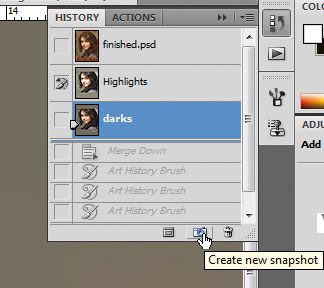
You take the brush and revert whatever area you draw on to the previous image you had. It's wonderful and is worth its weight in gold. Just saying.
Friday, December 2, 2011
H.I.B. (It's Legit)
All joking aside, harassment, intimidation, and bullying is a serious problem, not only in the United States, but all across the world. H.I.B., as it is now referred to as, has been an epidemic among students and adults for centuries. This maltreatment is unacceptable and needs to end immediately! This week, we used our photoshop lesson to help prevent this. I took the movie poster for "The Wizard of Oz"and made an anti-bullying poster instead.

Prevent H.I.B. Stand up for your friends and keep the peace.
Wednesday, November 23, 2011
Senior Switch Day
For first period, the wonderful Brian Murphy was my teacher. We had a battle to the death over how to effectively search on Google. Well, it wasn't to the death, but it was for a pack of 2 1/2 pound Reese's peanut butter cups!

We lost (but deserved to win). Did you know that Google's "cached" pages are simply a stored version of a website page? It's not just highlighted words! And you can put a PDF on Google docs... as a PDF! You just push
UPLOAD (right next to the CREATE button on the left side of the screen)
and then declick
Convert text from PDF and image files to Google documents
You learn something new everyday.
-Emily
Subscribe to:
Comments (Atom)